Rules and settings
Every campaign starts from the 2014 or the 2024 rules. On the Rules & Settings page you then decide how your table plays, and every decision appears on the campaign’s House Rules page, where your players can read it without asking you.
Some rules the app applies for you. Others are your table’s to apply: the app records your choice and shows it to the players, and the dice and judgement stay with you. Each rule below says which kind it is.
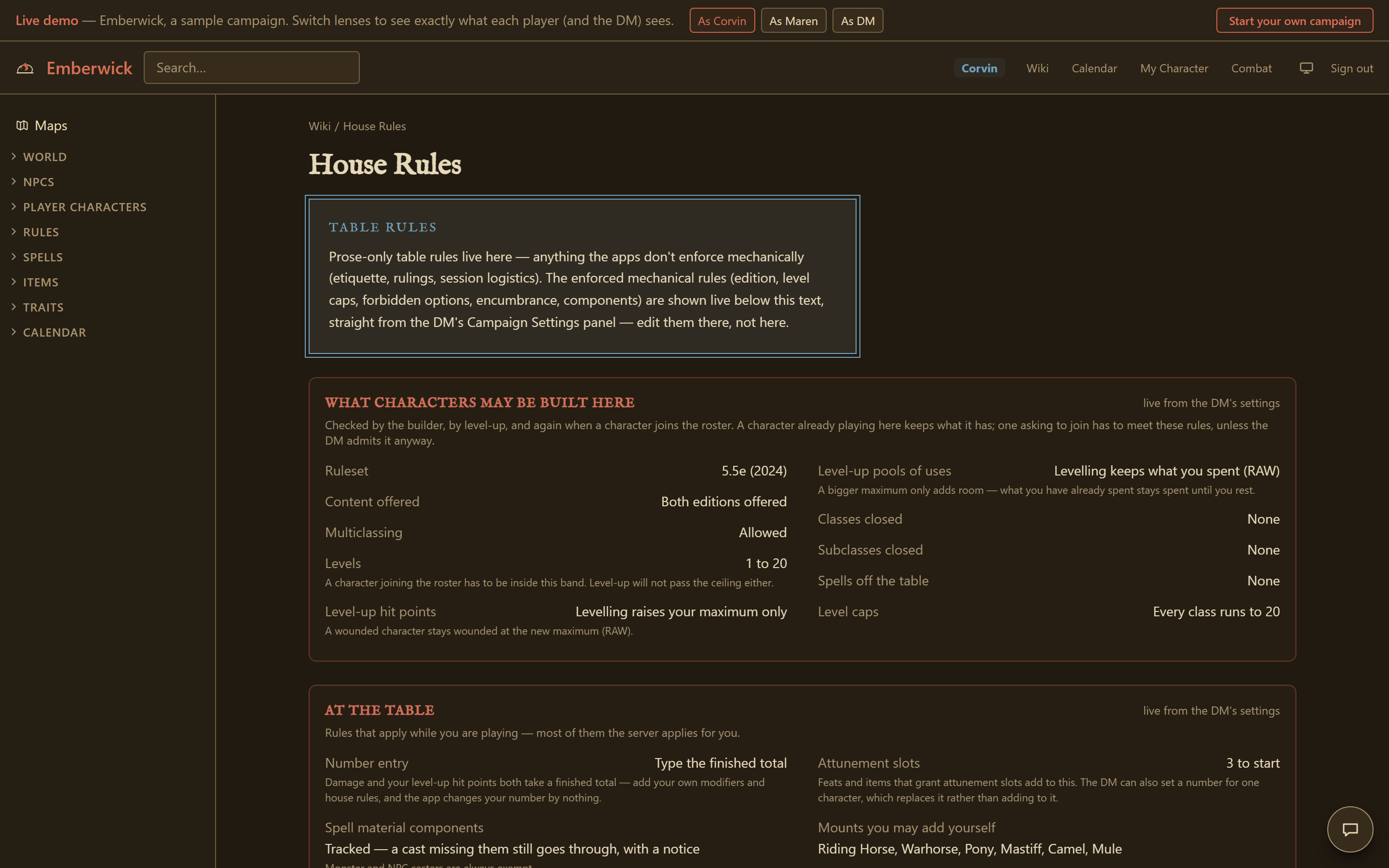
Settings for the whole campaign
These are set on the Rules & Settings page and listed in groups on House Rules: which edition and content the builder offers, level limits and multiclassing, levelling up, spell components, carrying weight and coins, critical hits, death saves, damage between characters, the reaction window, monster health shown to players, lingering injuries and dread, ammunition recovery, loot after a fight, and what the session close-out records. The Rules & Settings page explains each one where you change it.
Optional rules
Rules your table may run or skip, at either edition. Some of them the app helps with; each one says so on its own line.
Feats
Applied by the app. Off removes the feat half of the ASI-or-feat choice, wherever it is spent: at level-up, or building a character directly above level 1. The ability/feat slot a class earns at 4, 6, 8, 10, 12, 14, 16 and 19 grants an Ability Score Improvement only; a feat cannot be chosen there. It does not touch a background's level-1 Origin feat grant, the separate free-feat-at-level-1 or Origin feats house rules, or a 19th/20th-level Epic Boon, which is the class table's own feature either way. A character who already holds an ASI-slot feat keeps it; this is not applied retroactively.
Whether characters may take feats. Optional in 5e, core in 5.5e.
- Available (default). Feats are available to characters.
- Off. Characters do not take feats at an ASI level, however their character reaches it. Ability Score Improvements only. A background's own Origin feat still applies, and any character who already took an ASI-slot feat keeps it.
Measuring distance
Applied by the app. The map ruler measures with this rule and prints its name beside the number, so it is never silently one convention. Grid and hex modes count squares using the map's own scale as the square size, so they need a map with a scale set; a map without one still says 'no scale set'.
Which rule the map ruler uses for diagonals.
- Straight line (default). Distance is measured in a straight line, ignoring the grid.
- Grid 5-5-5. Distance counts squares, and a diagonal costs the same as a straight step (5-5-5).
- Grid 5-10-5. Distance counts squares, and every second diagonal costs double (5-10-5, the printed variant).
- Hex. Distance counts hexes, which have no cheap diagonal.
Ability scores
Applied by the app. The app checks the scores against the method you pick. Point buy must spend all 27 points on scores between 8 and 15, and standard array must be exactly 15, 14, 13, 12, 10 and 8. Rolled accepts typed numbers in the 3 to 18 range, since the app never rolls dice itself. Under Players choose, each player says which method they used and the builder holds them to it. A method this campaign does not allow cannot be picked.
How characters generate ability scores, or leave it on Players choose so each player picks a method in the builder.
- Players choose (default). Each player picks their own method in the builder: standard array, point buy, rolled, or typed numbers. Every build says which method it used and is held to that rule.
- Point buy. Ability scores are bought with 27 points, each score between 8 and 15 before racial or background improvements.
- Standard array. Ability scores are the standard array: 15, 14, 13, 12, 10, 8, assigned as you like.
- Rolled. Ability scores are rolled at the table and typed in; the builder accepts any set a d6 method could produce.
Free feat at level 1
Applied by the app. The character builder offers one extra ability-or-feat slot at level 1 and accepts the pick. The slot is extra; the level-4 improvement still comes at level 4. Feat prerequisites are still checked, so a level-1 character cannot take a feat that needs level 4.
Give every character one feat at level 1, on top of the ASIs their class earns.
- Off (default). No feat at level 1. Improvements start at the levels your class grants them.
- On. Every character takes one feat at level 1, in addition to the Ability Score Improvements their class earns (house rule).
Origin feats
Applied by the app. As printed, your Origin feat is the one your background grants. On free pick, you may choose any Origin feat you can see in the library, though your background's own feat is still offered first; a feat outside that list cannot be picked. Either way the feat is still a grant rather than a slot: it costs no Ability Score Improvement and cannot be taken twice.
Whether a character's Origin feat is the one their background prints, or any Origin feat they like.
- As printed (default). Your Origin feat is the one your background gives you.
- Free pick. You may take any Origin feat at level 1, whatever your background prints (house rule). Your background's own feat is offered first.
Flanking
Applied by the app. The app cannot see positions, so it never works out who is flanking whom. The DM ticks Flanked on a combatant in the tracker, and the target's card shows a reminder of advantage or +2, depending on this setting. The app adds nothing to the attack roll. Whether the attack is melee, and whether it counts, is up to the table. Turning the rule off removes the reminder from every Flanked marker at once.
The printed flanking variant: off, advantage, or a flat bonus.
- Off (default). No flanking bonus.
- Advantage. Flanking a creature grants advantage on melee attack rolls (printed variant).
- +2 bonus. Flanking grants a +2 bonus to melee attack rolls (printed variant).
Gritty rests
Applied by the app. The rest buttons show the real duration this resolves to. The DM's party rest moves the campaign calendar forward by that many hours or days, the same way the DM's own Advance Time control would. If that move crosses one or more dawns or dusks, the DM is asked once whether to apply what they bring (recharges, and any injury healing days), the same question a multi-day Advance Time jump asks. Answering Skip, or a rest too short to cross one, leaves those untouched, same as before. What a rest restores (HP, slots, feature uses) is unaffected either way; only how much time passes changes. The long rest's 7 days are 7 days of the campaign calendar's own day length (210 hours on a 30-hour day); the hour-based rests stay hours. Choosing the safe-haven option keeps the same lengthened hours and adds one more condition: a long rest is refused unless the DM ticks a checkbox confirming the party is somewhere safe. That checkbox is unticked by default every time, and the app never works out on its own whether a place counts as safe; the DM's own word is the only thing that counts. A player cannot confirm this on their own behalf, only the DM can. The standard gritty option and the safe-haven option are not run together; a table picks one posture at a time.
The gritty-realism resting variant lengthens both rests, with an optional safe-haven requirement on the long one.
- Standard (default). Standard rests: a short rest is 1 hour, a long rest 8 hours.
- Gritty realism. Gritty realism: a short rest is 8 hours, a long rest 7 days (printed variant).
- Gritty + safe havens. Gritty realism, plus safe havens. Same durations (short rest 8 hours, long rest 7 days), and a long rest only counts if the DM confirms the party is in a safe haven (printed variant).
Slow natural healing
Applied by the app. A long rest still does everything else it always did: Hit Dice are regained exactly as before (half the total, rounded up, minimum one), spell slots refill, the usual conditions clear, death saves reset, and Exhaustion drops one level. Only current hit points are left exactly where they were, so a character who goes to sleep at 10 of 40 wakes at 10. Hit Dice can still be rolled and spent to heal at any time, before or after a long rest, the same as always. The rest button and its completion message say plainly that no hit points came back.
A long rest restores no hit points. Characters heal only by rolling and spending Hit Dice.
- Standard (default). A long rest restores all missing hit points, as normal.
- Slow healing. A long rest restores no hit points. Roll and spend Hit Dice to heal instead (variant rule).
Sleeping in armor
Applied by the app. Checked when a long rest is taken, against the body armor the character has equipped. Light armor, a shield on its own, and no armor are unaffected. In medium or heavy armor the rest returns a quarter of the Hit Dice already spent, rounded down, at least one when any are spent, and never more than were spent; this replaces the usual half of the total. Exhaustion stays at its current level instead of dropping by one. Hit points, spell slots, death saves and every other condition are restored as normal. A multiclass character's spent dice are counted across all their pools. A party rest applies it to each character by their own armor.
A long rest taken in medium or heavy armor returns only a quarter of your spent Hit Dice and does not lower Exhaustion.
- Standard (default). A long rest returns half your Hit Dice and lowers Exhaustion by one, whatever you slept in.
- Armor matters. A long rest in medium or heavy armor returns only a quarter of your spent Hit Dice and does not lower Exhaustion (variant rule).
Proficiency dice
Applied by your table. The app records your choice and shows it on House Rules.
Replace the flat proficiency bonus with a rolled die (printed variant).
- Flat bonus (default). Proficiency bonus is a flat number.
- Dice. Proficiency bonus is rolled as a die that grows with level (printed variant).
Hero points
Applied by the app. Every character's sheet carries a Hero Points pool while this is on. The printed rule gives 5 plus half your level, rounded down, and the whole pool is replaced when you level up, never by a rest. The per rest house rule is the same size but refills on a long rest instead. The per session and DM granted house rules hold at most one point at a time; the app has no notion of a session boundary to reset that on its own, so the DM hands the point out by hand, the same way for both of those two options. A player spends a point from their own sheet, and a player cannot spend below zero; only the DM can add a point back. Turning the rule off hides the pool without losing anyone's count, so switching it on again later picks up where it left off. The app never rolls the d6 a spent point adds; you roll it yourself and add it to the attack, check, or save you just made.
Whether characters hold a pool of bonus d6s, and which version of the rule you run.
- Off (default). No hero points.
- Printed variant. Each character holds 5 plus half their level in hero points and may spend one to add 1d6 to a d20 test. The pool refills at level-up, not on a rest; anything unspent is lost then (printed variant).
- House: per rest. Hero points (house rule): the same 5 + half level pool and the same 1d6 on a d20 test, but it refills on a long rest instead of at level-up. This is our table's change, not the printed variant.
- House: 1 per session. Hero points (house rule): one point per character per session, spent to add 1d6 to a d20 test. Unspent points do not carry over. This is our table's change, not the printed variant.
- House: DM-granted. Hero points (house rule): no standing pool. The DM hands a point out for good play, and it adds 1d6 to a d20 test. This is our table's change, not the printed variant.
Identifying magic items
Applied by the app. The app applies this as the default every time an item reaches a character: the sheet's add form, the admin grant, loot assignment, custom loot, and a collection handed over whole. A DM who has set it on does not have to remember the tick each time. A shop's curio line is the deliberate exception and stays explicit, since veiling a shelf line also needs an asking price a default cannot invent, and a curio priced from the library would give away the item's rarity in gold. It decides nothing else: whether an item is veiled is stored on that item, so turning this off later re-identifies nothing, and the Identify button still works. What counts as identifying something is still the table's call; the app has no ritual, check or time cost.
Whether this campaign hands out magic items whose powers stay hidden until someone identifies them. With it on, anything you hand out starts unidentified unless you untick it; with it off, nothing does. Either way, you can veil or reveal any single item yourself; this line only sets the starting position.
- Off (default). Magic items work the moment you get them. The DM can still hand over a particular item unidentified, but nothing arrives that way by default.
- On. Magic items reach you unidentified unless the DM says otherwise. Until one is identified, its powers do nothing and its description stays hidden: you see the plain item, and its library page stays closed to you. Any bonus it gives to your attack rolls or AC still applies, though, so an attentive player can work out a hidden +1 from the arithmetic. What counts as identifying something is the table's call: the app has no ritual, no check and no time cost, only the DM's reveal.
Group initiative
Applied by the app. At encounter start, Per group takes the first initiative you typed for each set of monsters that use the same monster entry (a custom entry or a summon with no vault monster is its own group of one) and applies it to every member of that set; Per side does the same across every monster in the fight, one shared roll for the whole side. Either way the turn order is re-sorted so a group's members land on consecutive turns at their shared count. Player characters always keep the initiative you typed for them.
Whether monsters roll initiative individually, one roll per group of identical monsters, or one roll for the whole monster side.
- Off (default). Every combatant, monster or player, rolls its own initiative.
- Per group. Monsters of the same kind share one initiative roll and act on consecutive turns at that count; players still roll their own (printed variant).
- Per side. All monsters in the fight share one initiative roll; players still roll their own (printed variant).
Cantrip swap at level-up
Applied by the app. The level-up screen offers this swap automatically to a 2024 Bard, Cleric, Druid, Sorcerer, Warlock, Paladin, or Ranger who already knows a cantrip to give up, whether this setting is on or off, because the books grant it unconditionally. With this setting on, the same swap is also offered to a 2014 caster of any class, and to a 2024 Wizard leveling up. The cantrip given up must be one the character already knows on that class, and the cantrip received must be one the class could otherwise learn; a cantrip from a different class's own list is always refused. A Paladin or Ranger who picked up cantrips through a fighting style swaps within the list those came from, Cleric's or Druid's, since that style grants no list of its own.
Lets a caster replace one known cantrip with another from the same class's list when they level up. A 2024 Bard, Cleric, Druid, Sorcerer, Warlock, Paladin, or Ranger already has this as a printed rule and gets it either way this is set. This setting extends the same swap to a 2014 caster of any class, and to a 2024 Wizard leveling up.
- Off (default). Off here does not remove the swap for the classes that already print it. A 2024 Bard, Cleric, Druid, Sorcerer, Warlock, Paladin, or Ranger can still replace a cantrip every level, because the books already say so. Off only means a 2014 caster, or a 2024 Wizard leveling up, gets no swap.
- On. A caster leveling up may replace one known cantrip with another from the same class's list. A 2024 Bard, Cleric, Druid, Sorcerer, Warlock, Paladin, or Ranger already has this for free either way; turning this on adds it for a 2014 caster of any class, and for a 2024 Wizard leveling up.
Which edition's version
Both editions have these rules and word them differently, so the only question is which printing you use. Each follows your ruleset until you pin it.
Exhaustion
Applied by the app. The app works out the Exhaustion penalties on every sheet and card from the model you pick. It shows them and never stops a character acting.
Which exhaustion table your conditions use. Independent of the ruleset button.
- 5e ladder. Exhaustion (5e): six cumulative tiers. Level 1 disadvantage on ability checks, level 2 speed halved, level 3 disadvantage on attacks and saves, level 4 hit point maximum halved, level 5 speed 0, level 6 death. A long rest removes one level.
- 5.5e −2/level (default). Exhaustion (5.5e): every D20 Test is reduced by 2 times your exhaustion level and your Speed drops by 5 feet per level, cumulatively, until level 6 is death. A long rest removes one level.
Two-weapon fighting
Applied by the app. The sheet generates the off-hand attack itself: it appears whenever two different light weapons are equipped, with the ability modifier left out of its damage unless you have the Two-Weapon Fighting style (a negative modifier still applies, per the Light property). It is tagged as a Bonus Action. Whether you actually have the Nick mastery, and whether you spent your Bonus Action already, are for you to track; the sheet does not check them.
Which edition's off-hand rules the sheet builds your extra attack from.
- 5e. Two-weapon fighting (5e): a Bonus Action to attack with a light off-hand weapon; add your modifier to that damage only with the Two-Weapon Fighting style.
- 5.5e (default). Two-weapon fighting (5.5e): the Light property gives one extra attack as a Bonus Action with a different light weapon, and you add no ability modifier to its damage unless it is negative or you have the Two-Weapon Fighting style. The Nick mastery lets that extra attack ride the Attack action instead, once per turn.
Drinking a potion
Applied by the app. Every potion in the library is tagged with this action, and the tracker's Use item panel shows it on the potion you pick. Whether the action or the Bonus Action is still free is yours: the tracker does not count them, and never blocks a potion.
What a potion costs on your turn. Sets the action shown wherever a potion is used.
- 5e. Drinking a potion (5e): an action; administering one to another creature is also an action.
- 5.5e (default). Drinking a potion (5.5e): a Bonus Action, and so is administering one to another creature.
Grapple
Applied by the app. Under 5.5e the sheet works out your grapple DC (8 + Strength modifier + proficiency), which is also the escape DC, and the tracker offers a one-click prompt. Under 5e there is no DC to work out because both sides roll, so the prompt takes both totals and suggests the winner. Applying the Grappled chip stays your click, and nothing checks size or a free hand.
Which grapple rule the sheet and the tracker prompt you through.
- 5e. Grapple (5e): a special melee attack, an Athletics check contested by the target's Athletics or Acrobatics.
- 5.5e (default). Grapple (5.5e): part of the Attack action. The target makes a save (DC 8 + Strength modifier + proficiency); there is no contest.
Surprise
Applied by the app. The encounter setup screen gains a Surprised tick beside each initiative box. Under 5e the marked combatants start with the Surprised condition, on players and monsters alike; under 5.5e they lose no turn and the screen tells you to roll their Initiative with disadvantage and type the lower die, because the app never rolls. Clearing the chip afterwards is yours.
What happens to a combatant you mark as surprised when combat starts.
- 5e. Surprise (5e): a surprised creature can't move or act on its first turn and can't take reactions until that turn ends.
- 5.5e (default). Surprise (5.5e): a surprised creature rolls initiative with disadvantage and loses no turn.
Counterspell
Applied by the app. When a player declares Counterspell in a reaction window, the DM banner names the check and works out the number: 5e's auto-stop below 4th level or DC 10 + the spell's level, 5.5e's Constitution save against the counterspeller's own spell save DC. Both outcome buttons are always offered and the DM clicks one; nothing counters itself, including the automatic case.
Which counterspell resolution the tracker prompts you through.
- 5e. Counterspell (5e): a reaction; it auto-stops a spell of 3rd level or lower, otherwise an ability check (DC 10 + the spell's level).
- 5.5e (default). Counterspell (5.5e): a reaction; the other caster makes a Constitution save against your spell save DC (8 + your proficiency bonus + your spellcasting modifier) or the spell fails.
Ritual casting
Applied by the app. The sheet offers "Cast as a ritual" only when your class may cast that spell as a ritual. Under 5e that is a bard, cleric, druid or wizard; under 5.5e any spellcaster may. The app also refuses a ritual cast that the rule does not allow, so the choice cannot be forced. A 5e wizard casting a ritual straight from the spellbook without preparing it is left to your table.
Which edition's ritual-casting rule you use. Under 5e only a class whose own Spellcasting feature grants it (Bard, Cleric, Druid, Wizard) can cast a ritual-tagged spell as a ritual; under 5.5e any class that prepares spells can. The sheet's "Cast as a ritual" checkbox is offered only to an eligible class, and the sheet will not let a class cast a ritual the rule does not allow.
- 5e. Ritual casting (5e): a spell with the ritual tag can be cast in +10 minutes without a slot if your class allows it; a wizard can ritual-cast from the spellbook without preparing it.
- 5.5e (default). Ritual casting (5.5e): a spell with the ritual tag can be cast in +10 minutes without a slot if you have it prepared.
House rules this campaign adds
Rules no printing carries: this platform's own, off unless you switch them on. The app applies them, so a player feels them without you having to remember.
Who rolls lingering injuries and madness
Applied by the app. Every injury or madness trigger (a crit downing, a revive, a stabilise, or the DM's own Inflict injury / Madness buttons) still decides who is affected and which table applies, exactly as before. Under The table rolls, that affliction waits on the character until the DM types the d20 (d100 for madness) or presses Roll for me, which rolls the same die the app would have used. Only whose hand produces the number changes, never which table it is checked against. An injury that causes a madness result waits for its own second roll rather than rolling it immediately. A homebrew affliction table the DM rolls from Inflict affliction waits the same way, on the table's own die. The recurring hit point loss from an injury you already have (Festering Wound, burn, frostbite) is a different roll, the ongoing cost of a chosen injury rather than a table lookup, so it is always rolled by the app in both modes.
Whether the app rolls the lingering-injury, madness and homebrew affliction tables for you, or your table rolls the physical die and types it in.
- The app rolls (default). The app rolls lingering injuries, madness and homebrew affliction tables the moment they trigger.
- The table rolls. Lingering injuries, madness and homebrew affliction tables open a prompt for the DM to type the die roll, or press Roll for me, instead of rolling automatically (house rule).
Massive damage
Applied by the app. The moment a hit's damage, after temp hit points and wards, reaches at least half a creature's hit point maximum, a DC 15 Constitution save prompt appears on its card. A later hit that also qualifies replaces the open prompt rather than stacking a second one. On a failed save the card shows a system-shock sentence for the table to apply by hand; the app never rolls the save or applies the outcome itself. Skip is the only control; there is nothing to Apply.
A single hit reaching at least half a creature's hit point maximum asks for a Constitution save against the shock of the wound.
- Off (default). No massive-damage save.
- On. A single hit reaching at least half a creature's hit point maximum (after temp hit points) puts a DC 15 Constitution save prompt on its card. A failed save is shown as a system-shock outcome for the table to apply (house rule).
Your players find all of this on the House Rules page of your campaign. How the builder and the sheet follow these settings is in Your character.